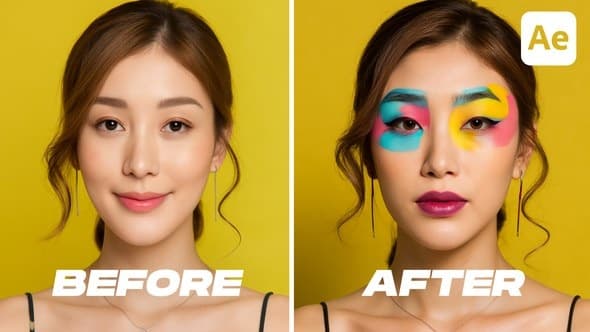
Dynamic Before and After
From Videohive · Added Oct 15, 2026
About this item
Dynamic Before and After – Bold Visual Comparison Toolkit for After Effects
Make every transformation feel powerful and dramatic — with bold typography, animated split screens, and high-impact reveals.
The Dynamic Before & After template from the all-in-one Before & After Pack is made for strong visual storytelling. Each scene begins with a full-screen “Before” image, followed by a smooth slide-in of the “After” screen, finishing with a bold crossover motion that completes the comparison. Combined with oversized “Before” and “After” text, this style adds energy and focus to every transition.
Perfect for showcasing:
Makeup transformations — before and after application
Construction progress — from blueprint to finished site
Urban change — from old neighborhoods to renovated districts
Fashion styling — different outfit reveals on the same model
Location comparisons — day vs night, pre/post renovation
Who It’s Made For
Beauty and fashion influencers
Construction and real estate marketers
Architects and urban planners
Content creators and storytellers
Video editors seeking bold, cinematic transitions
️ Powerful Customization & Flexible Controls
This template was built with customization in mind — giving you full control over how your content is presented.
Tailor-made to cater to any video’s needs, the Before & After Pack offers an intuitive, user-friendly interface that simplifies video editing while ensuring high-quality results. Suited for both beginners and seasoned professionals.
Timing Adjustment: Master your scene duration.
Stand out with the pack’s unique one-click feature that allows you to adjust the duration of Scenes effortlessly. This ensures your content flows seamlessly, keeping your audience engaged.
Synchronized Rhythm: Simple Speed Control.
Have complete control over your storytelling pace with the handy speed control feature. Alter the speed of Scenes with a single click to match the rhythm of your narrative.
⚙️ Key Features
Speed & duration control with one-click sliders
Background, stroke, and corner roundness control
Beginner-friendly interface
What’s Included
100% After Effects Template
Compatible with After Effects 24.7.0 and above
Universal Expressions — works in any language version of AE
No Plugins Required
Show the difference. Tell the story.
More from Videohive




In the price
- All files of the item
- Delivery to your Telegram chat
Not in it
- Refunds, all sales are final
- One-to-one mentoring
- Certificates from the original school