By Udemy · Official page
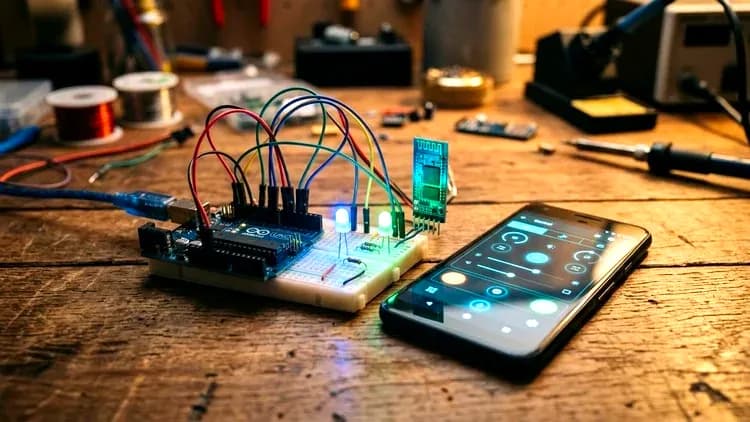
Arduino + MIT App Inventor: Android-Controlled Hardware
About this item
Transform your smartphone into a powerful wireless controller and monitoring dashboard for real-world Arduino projects!
Most embedded systems and robotics courses focus exclusively on writing C++ code inside the Arduino IDE, leaving the user interface as an afterthought. Conversely, many mobile app development courses never touch physical hardware. This course bridges that gap by combining Arduino microcontroller hardware with MIT App Inventor Android app development.
Course Curriculum
- Project 1: Wireless Bluetooth LED Controller — Learn circuit wiring on a breadboard, UART serial reading in Arduino C++, UI design in MIT App Inventor, and one-way command transmission ('1' and '0') to control physical pins wirelessly.
- Project 2: Voice-Controlled Arduino Assistant — Integrate speech-to-text artificial intelligence using Android's SpeechRecognizer component to command your Arduino hardware hands-free using natural voice phrases ("Turn On", "Turn Off").
- Project 3: Smart Fire Alarm & Sensor Telemetry System — Master reverse data flow: stream real-time digital flame sensor readings from Arduino over Bluetooth to your phone, implement automated Clock timer polling in App Inventor, and trigger mobile alarms and visual warnings.
- Project-Based & Practical: No endless theory. You start with hardware assembly, proceed to firmware programming, build the mobile UI, and finish with a working physical result.
- Broadcast-Quality Audio & Video: Master 1080p high-definition lessons with professional on-screen callouts, code highlighting, and crystal-clear narration.
- Complete Downloadable Resources: Every Arduino sketch (.ino), wiring diagram, and App Inventor setup guide is provided in the downloadable resources.
- Hardware Gotchas Solved: Avoid beginner pitfalls! Learn why TX/RX pins must be disconnected during sketch upload, how to protect the 3.3V logic level of the HC-05, and how to configure Android 12+ Bluetooth permissions.
- Makers, hobbyists, and electronics enthusiasts looking to add professional mobile control to their Arduino projects.
- Students and educators seeking practical STEM / IoT curriculum examples.
- Beginner developers who want to build physical computing apps without writing complex Java or Kotlin code.
Frequently Asked Questions
How does instant Telegram delivery via @madbaxapp_bot work?
Activate any plan from $5, then press Download on this page: 1 file (804.4 MB) are sent to your Telegram chat instantly by the bot @madbaxapp_bot.
How do I extract multi-part .part01.rar archives on Windows and macOS?
Download all volumes (.part01.rar, .part02.rar … .partN.rar) into one folder, then start the extraction only from the first volume, part01.rar. On Windows use WinRAR or 7-Zip; on macOS use Keka or The Unarchiver. The other volumes are read automatically.
What is included in the download archive?
The archive includes all project and video files for this release. It does not include one-to-one mentoring or certificates from the original school.
Related Assets

The Gnomon Workshop – Art Direction for Film Creature Design Development
Included in plans
Make Short Films in Unreal Engine 5 with Metahumans
Included in plans
The Gnomon Workshop – Creating Complex Materials for Games in Substance Designer
Included in plans
The Gnomon Workshop – Animating a Complex Fight Action Sequence in Maya advanced body mechanics with Peter Dang
Included in plans
The Gnomon Workshop – Introduction to Maya for Animators
Included in plans
Unreal Engine 5 – Cinematic Car Animations for Beginners by Nafay Sheikh
Included in plansMore from Madbax

The Gnomon Workshop – Nuke Projection Workflows for Feature Films
Included in plans
Patata School – Character rigging and animation in Blender
Included in plans
Patata School – Complete Character Animation in C4D & Marvelous Designer
Included in plans