By Udemy · Official page
Krita Digital Painting for Beginners: Sketch to Finish
About this item
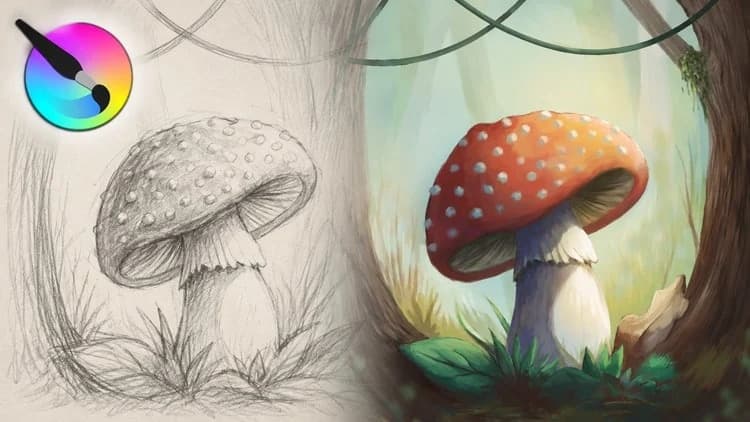
Paint a mushroom in 12 guided stages, with real-time demonstrations of sketching, colour, lighting and finishing
Learn digital painting in Krita by following a complete mushroom painting from the initial concept to the finished artwork.
If you have ever started a digital painting and wondered what to do next, this beginner-friendly course gives you a practical sequence to follow. Across twelve guided stages, you will see how a painting develops through sketching, colour, shadows, lighting, texture and final adjustments.
With over two hours of real-time teaching, you can watch the drawing and painting process unfold while hearing my thought processes along the way. I explain what I am looking at, why I make particular choices, and how I evaluate the image before moving forward.
Follow the whole painting process
We begin by establishing the goal for the image, building a rough sketch and refining the drawing. From there, we consider values and lighting, establish the flat colours, and introduce the larger shadow shapes.
As the painting develops, we explore light and form, colour variation, edges and selective blending. We then add texture and detail, develop the background, and bring the image together through final adjustments and review.
The mushroom provides a manageable subject for practising these stages, with opportunities to explore rounded forms, contrasting colours and surface details.
Understand the decisions behind the brushwork
Knowing which tool to use is only part of painting. You also need to decide where to place a shadow, which areas need more attention, and when to leave something alone.
Throughout the demonstrations, I talk through these decisions as they arise. You will see adjustments and evaluations within a natural working process, helping you understand how to assess your own painting as it develops.
Who is this course for?
This course is designed for beginners who want to complete a guided digital painting in Krita. It is also suitable for learners who have experimented with digital art but would like a clearer workflow to follow.
The focus is a practical painting project. A little familiarity with finding brushes, choosing colours and using layers in Krita will help you follow along.
What you need
You will need Krita installed on your computer. A drawing tablet or pen-enabled display is recommended for following the drawing and painting demonstrations.
You can pause, replay and work at your own pace. A silent speed-painting overview is also included as a bonus, allowing you to watch the complete painting develop in a condensed form.
By the end, you will have followed a painting from concept to final render and practised a sequence you can use as a starting point for future artwork.
What you will learn
- Develop a digital painting in Krita from an initial concept and rough sketch to a finished image.
- Build form using flat colours, larger shadow shapes, lighting and colour variation.
- Use edges, selective blending, texture and detail to develop your painting.
Frequently Asked Questions
How does instant Telegram delivery via @madbaxapp_bot work?
Activate any plan from $5, then press Download on this page: 1 file (3.1 GB) are sent to your Telegram chat instantly by the bot @madbaxapp_bot.
How do I extract multi-part .part01.rar archives on Windows and macOS?
Download all volumes (.part01.rar, .part02.rar … .partN.rar) into one folder, then start the extraction only from the first volume, part01.rar. On Windows use WinRAR or 7-Zip; on macOS use Keka or The Unarchiver. The other volumes are read automatically.
What is included in the download archive?
The archive includes all project and video files for this release. It does not include one-to-one mentoring or certificates from the original school.
Related Assets
Anime Character Design for Level Up – Key Points Breakdown with Wingfox Studio
Included in plans
21 Draw – Introduction to Digital Drawing – Frank Calico
Included in plans
Drawing Basics by Stan Prokopenko (1-25)
Included in plans
CLASS101+ | Fill the world of famous fairy tales with your own color
Included in plans
CLASS101+ | Create Cute with a Touch of Dark Anime Illustrations
Included in plans