By Udemy · Official page
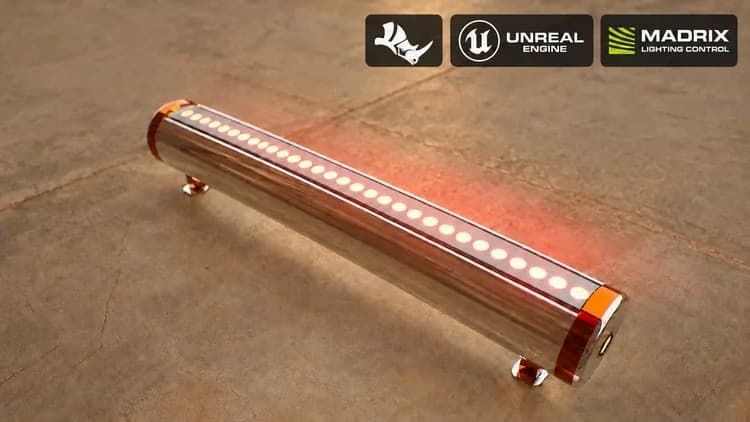
Rhino to Unreal Engine 5: Wallwasher DMX with MADRIX
About this item
This course contains the use of artificial intelligence.
Course scope and expectations: This is a project-based workflow and design-development demonstration, not a complete Rhino or Unreal Engine training course. It does not teach either application from the beginning or explain every command, feature, or setting. Instead, it follows a specific wallwasher project through selected stages in Rhino, Unreal Engine 5, and MADRIX, showing how the design idea develops into a visual lighting presentation. Basic familiarity with Rhino and Unreal Engine is expected. Some operations continue inside an existing Unreal project and may move quickly. Review the curriculum and preview lesson to confirm that this workflow matches what you want to learn.
Artificial intelligence is used for the English narration and certain visual assets. The software demonstrations show the instructor's project workflow; the focus is on design decisions, handoffs between tools, and the finished lighting concept.
In this project-based course, you will follow a wallwasher lighting project from its 3D model to an animated lighting presentation. The workflow connects Rhino modeling, Unreal visualization, and MADRIX lighting control.
The project begins in Rhino with a supplied reference image. You will see the wallwasher body, end caps, circular details, upper strip, and support feet modeled, organized in layers, and prepared with materials for export.
Next, the model is exported and FBX assets are brought into Unreal Engine 5. The demonstrations cover assigning materials, adjusting component pivots, refining the model, preparing scene lighting, and building a DMX-responsive wallwasher fixture.
The project then connects Unreal Engine to MADRIX through Art-Net. You will see how RGB matrix data, universes, channels, and pixel mapping are set up and checked. Color and animated effects are tested in the Unreal viewport to show how lighting data appears on the product.
In the final section, lens masks are created in Photoshop and refined in the Unreal Material Editor. Wallwasher groups are arranged along textured walls and extended into a room layout. MADRIX effects such as Color Scroll, Clouds, Plasma, and Noise are compared while the lens appearance, fixture alignment, light direction, and wall coverage are reviewed from close and wide views.
This course is intended for 3D artists, product visualizers, and lighting designers who already know the basics of Rhino and Unreal Engine and want to understand this particular cross-application workflow. Required software licenses are not included. The project focuses on visual modeling and lighting presentation; electrical design, physical hardware commissioning, and manufacturing specifications are outside its scope.
What you will learn
- Model and organize a wallwasher in Rhino using a supplied reference image.
- Export FBX assets to Unreal Engine 5, assign materials, and refine component pivots and scene lighting.
- Configure an RGB matrix fixture, patch DMX channels, and connect Unreal Engine 5 to MADRIX through Art-Net.
- Create lens masks in Photoshop and refine an emissive lens material in the Unreal Material Editor.
- Map fixture groups in MADRIX, compare animated effects, and build a complete wallwasher lighting scene.
Frequently Asked Questions
How does instant Telegram delivery via @madbaxapp_bot work?
Activate any plan from $5, then press Download on this page: 1 file (1.1 GB) are sent to your Telegram chat instantly by the bot @madbaxapp_bot.
How do I extract multi-part .part01.rar archives on Windows and macOS?
Download all volumes (.part01.rar, .part02.rar … .partN.rar) into one folder, then start the extraction only from the first volume, part01.rar. On Windows use WinRAR or 7-Zip; on macOS use Keka or The Unarchiver. The other volumes are read automatically.
What is included in the download archive?
The archive includes all project and video files for this release. It does not include one-to-one mentoring or certificates from the original school.
Related Assets

Street Fighter Dragon UE5 Unreal 5 next-generation Game Character Production Process
Included in plans
DVIZ Virtual Reality on Unreal Engine 5
Included in plans
Unreal 5 Survival: Build a Complete Survival Game with Blueprint
Included in plans
Unreal Engine 2D: Make Your Own Epic 2D Games Using C++
Included in plans
DOUBLEJUMP ACADEMY Cinematics In Unreal Engine
Included in plans
Niagara Motion in Unreal Engine 5.4
Included in plansMore from Madbax
Shader Magic in Blender Ver 341 and above by Joaking Tornhill
Included in plans
Anime Character Design for Level Up – Key Points Breakdown with Wingfox Studio
Included in plans
Stylized 2D Toon Shader in Blender with Pierre Schiller
Included in plans