By Udemy · Official page
Houdini KineFX Rig Packaging
About this item
Preparing A KineFX Rig For Distribution
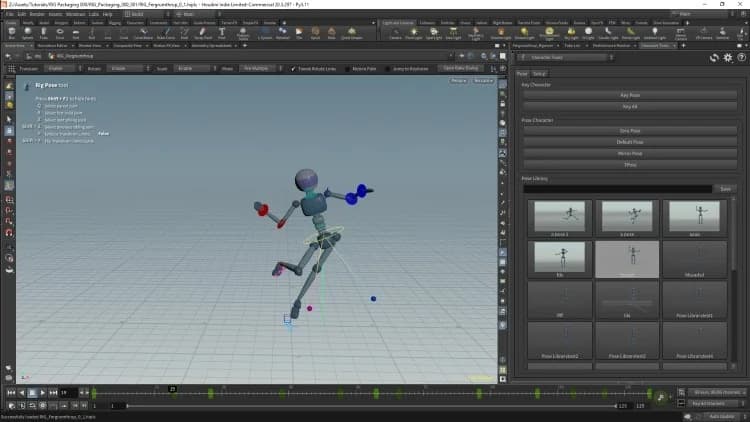
The creation of a rig does not just require the creation of mechanics, it also requires the creation of interfaces and tools. In this course we will be working on a KineFX rig in Houdini but we will not be working on the rig. Instead we will work on the creation of the interface for the rig, the distribution of the rig and the creation of tools to make the animation easier.
We will be working with a basic humanoid rig that has already been made. We will convert this from a network into a basic HDA that will allow animation to be performed with a single node. We also will discuss a couple of methods for distribution.
A rig is not a self-contained item as we will often need tools to make animation easier. These will include, channel groups, tools for easier keying of parameters as well as zero and default poses. We will also be creating a pose library which will allow is to store poses for the character. We will create these with HDA Interfaces as well as with custom python panels.
The selection of characters can also be made easier with character pickers and we will do this with both the default Houdini character picker as well a custom python panel.
What you will learn
- Create an interface for a KineFX rig.
- Create a Character Picker for a KineFX rig.
- Create a Pose Library for a KineFX rig.
- Create tools to make a KineFX rig easier to animate.
Who this course is for
- Intermediate Houdini users
Frequently Asked Questions
How does instant Telegram delivery via @madbaxapp_bot work?
Activate any plan from $5, then press Download on this page: 2 files (4.7 GB) are sent to your Telegram chat instantly by the bot @madbaxapp_bot.
How do I extract multi-part .part01.rar archives on Windows and macOS?
Download all volumes (.part01.rar, .part02.rar … .partN.rar) into one folder, then start the extraction only from the first volume, part01.rar. On Windows use WinRAR or 7-Zip; on macOS use Keka or The Unarchiver. The other volumes are read automatically.
What is included in the download archive?
The archive includes all project and video files for this release. It does not include one-to-one mentoring or certificates from the original school.
Related Assets

Alexunder Hess
Included in plans
Boring UI Course
Included in plans
Web Design Course 2 – Landing Pages
Included in plans
Ultimate Design Portfolio Bundle – Video Course
Included in plans
Web Design Course 1 – SaaS Product
Included in plans