Madbax Navigation - Complete Ultimate Edition

Search Madbax

Find courses, tutorials, and creative resources

Enter to search
↑↓ to navigate
Esc to close
Madbax Navigation - Complete Ultimate Edition

Search Madbax

Find courses, tutorials, and creative resources

Enter to search
↑↓ to navigate
Esc to close
Home Courses Houdini FXPHD – HOU234 – Crowds in Houdini
Houdini

FXPHD – HOU234 – Crowds in Houdini

Share

Class Listing

Class 1: Initial setup

The Mixamo database assists us in obtaining a model and motion capture library as a starting point. We create our assets in Maya and then use Houdini to initiate our crowd setup using the Agent node to import our assets and apply the motion capture. Finally, we enhance our model in Maya by adding shields and swords before transferring the asset to Houdini.
Class 2: Motion capture and run cycle

We apply our initial motion capture data and introduce additional variations in the run cycle. Next, we incorporate the swords and shields into our running agent. Finally, we explore how to manage all assets within a single agent.

Class 3

Now it’s time to to incorporate the ground from the VFX308 layout to assess our agent under realistic conditions. Additionally, we perform rigging and make terrain adjustments tailored to our specific model.

Class 4: Populating the scene

Next, we populate our asset with hundreds of agents, introducing variation and randomness in animation, props, agent size, and speed.

Class 5: Collision and interaction

We use a DOPnet to simulate and generate collisions among agents, allowing interaction with elements like diverse terrain. The setup necessitates a few adjustments, so we need to evaluate our previous configuration.

Class 6: Adding more variation

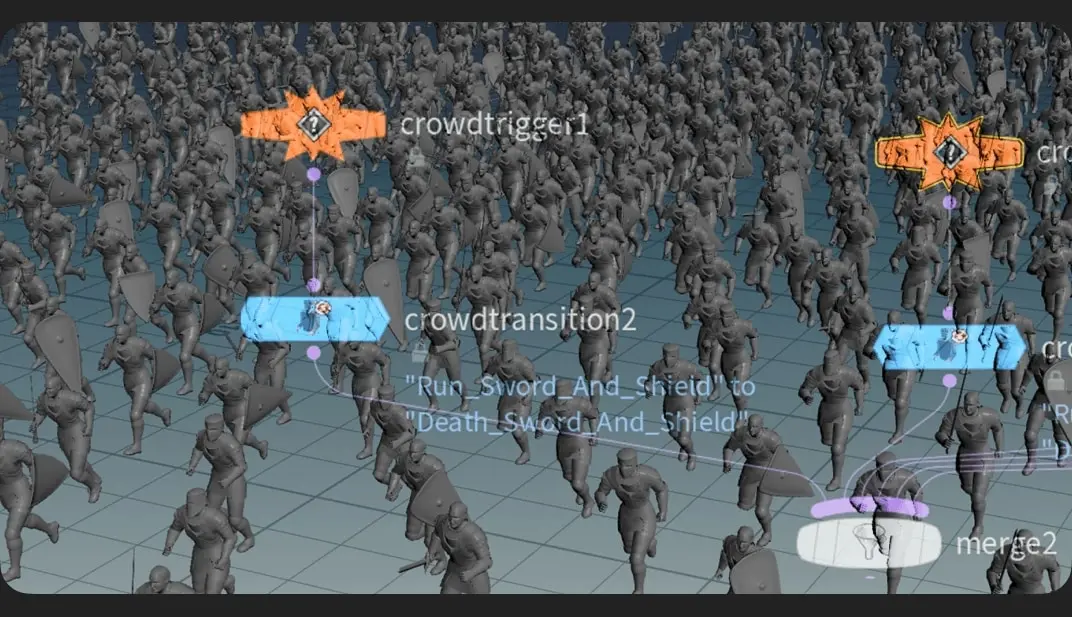
Incorporating various “dying” motion capture data to introduce variation based on factors such as Time, VEXpression, or Particle Speed. We adjust properties to enable the triggering of different motion capture animations based on specific action triggers.

Related Articles
Blender

Blender3D Assistant All-Round Class | Taught by Former FunPlus Art Director – 7.GAME

Since 2020, 3D assistance has become increasingly common in digital painting. Whether in the...

GEM

Сreators Сlub – Car Transformer Effect

6-hour in-depth tutorial right now! 🚀Everyone’s been asking for it, and it’s...

Single Purchase

Edgard Store – ClickZoom Pro

One-Click Zooms for Tutorials, Talking-Heads & Podcasts Point, click, zoom exactly where you...

BlenderSubstance painterUnreal EngineZbrush

Everything I learnt about Environment Art – Part 1- Planning & Blockout

This is the first part of an all-encompassing tutorial for beginners to...